




coolOrange powerJobs Configuration Assistance
Automate your PDF, STEP, and DXF publishing in most environments with Hagerman expert services.
Have Questions?
Request Info
Your CAD files, published instantly when checked in.
Automated File Publishing for Autodesk Vault
With Hagerman's coolOrange powerJobs Configuration Assistance, we install and configure coolOrange powerJobs so PDF, STEP, and DXF files generate automatically from Autodesk Vault. No manual exports. No forgotten formats. No more version drift.
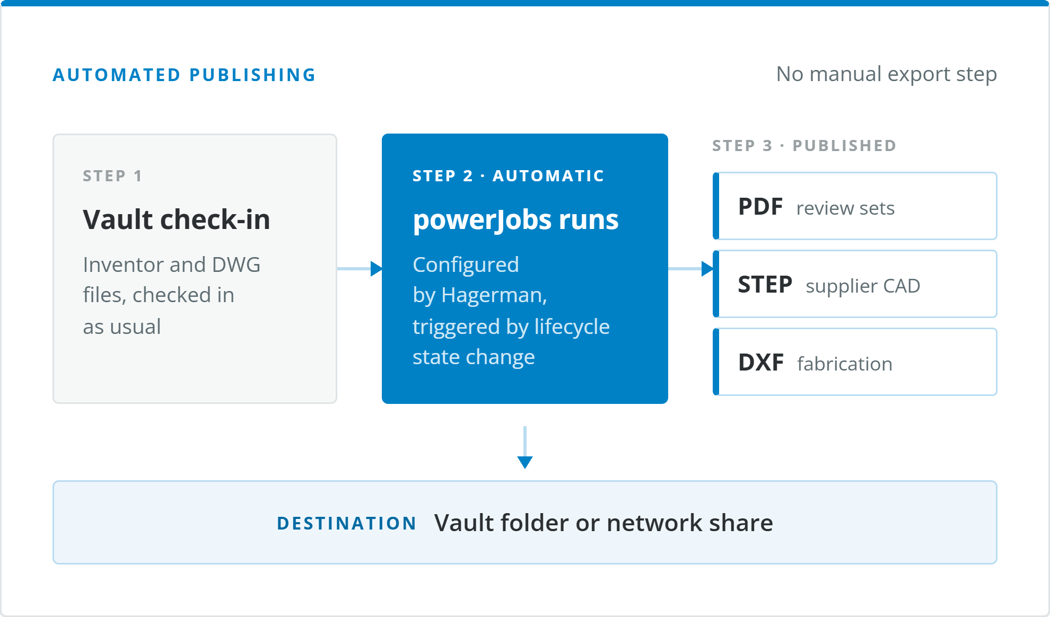
Three publishing scripts, built for your Vault setup
Each format is set up as its own powerJobs script, wired into your existing File or Lifecycle transitions. This means publishing happens as a natural part of the workflow you and your team already use - not as a separate step.
PDF Files
Drawing Publishing
Inventor and AutoCAD DWG files
Generated using Autodesk TrueView and coolOrange's default capabilities, with plot settings controlled through a DWG template.
STEP Files
Model Interchange
From Inventor model files
Natural 3D geometry ready to hand off to customers, vendors, or downstream CAM and simulation tools.
DXF Files
Flat Pattern Export
Inventor sheet metal flat patterns
Cut-ready flat patterns published straight from your sheet metal models. No manual re-export before it goes to the shop floor.
Files land where your team already looks for them
Storage location, naming, and version behavior are all configured to match how your organization already works.
Stored in Vault or on the network
Publish into Vault - as a single folder or alongside the source document, or copy out to a shared network folder that mirrors your Vault structure.
Version history where it matters
Files published into Vault keep full version history. Files on a network share are replaced with the latest version, keeping that folder clean.
Named the way your team expects
File names match the source documents, or are built automatically from Vault User Defined Properties you choose.
Wired into your existing transitions
Publishing triggers off the File or Item Lifecycle transitions you already use, so nothing changes about how your team checks work in.
Ready to stop exporting files manually?
The standard Hagerman & Company coolOrange powerJobs Configuration Assistance includes the services necessary to install and configure coolOrange powerJobs to provide PDF, STEP, and/or DXF publishing in most environments. Reach out to us today to get started.
Start Automating Your Publishing
Technical Details & Limitations
Every CAD environment is a little different. The 'out-of-the-box' Hagerman coolOrange powerJobs Configuration Assistance package covers Autodesk Inventor and AutoCAD DWG file publishing through Autodesk Vault. If you're working with other formats or a more complex setup, no problem! We can scope out a more in-depth solution to meet additional customization and configuration requirements.
Included services:
- Installation of coolOrange powerJobs software on 1 client computer
- Addition of custom job queuing to existing File or Item Lifecycle transitions
- Creation of custom scripts to automate publishing of PDF, DXF, and STEP Files
- Additional automations for file scripts can be configured:
- File may be added to Vault, either in a single folder or in the same folder as the source document
- File may be copied to a shared network folder or a structure derived from the Vault folder structure
- File will match the source file name, or a concatenation of Vault User Defined Properties assigned to source file
- Previous versions of documents in shared network locations will be overwritten; If applicable, Vaulted PDF/STEP/DXF files will retain version history
Limitations:
- Creation of AutoCAD PDF's is limited to the use of default coolOrange and Autodesk TrueView capabilities, including the use of a DWG template to specify plot settings
- Creation of PDF files applies only to Autodesk Inventor drawing formats and AutoCAD DWG files
- Creation of STEP files applies only to Autodesk Inventor model formats
- Creation of DXF files applies only to Autodesk Inventor sheet metal flat patterns
The following modules will only show up on dynamic pages, NOT this listing page.

Why Choose Hagerman
Hagerman & Company has built our success not only on the quality of solutions that we offer, but also on the relationships we’ve built with our clients. To do this, we have adopted a comprehensive Customer Success strategy designed to drive increased long-term customer value, improve the customer experience, and ensure customer satisfaction. This philosophy is shared across our entire organization, including sales, marketing, service delivery, and back-office support.
As a solution provider, we offer the tools to make your company more efficient, productive, and most of all, profitable. We do this by offering best-in-class software paired with professional services delivered by an exceptional team of industry consultants, solutions engineers, and support staff.

Let's Talk Strategy
Hagerman & Company can customize a solution to meet your company’s strategic goals. We connect, improve and automate efficient systems within your organization so you can deliver more innovative solutions to your customers.
Contact us today to schedule a business consultation.